
Using Walr’s “No Code” solution, our highly customisable custom questions allow you to modify them without needing to understand any coding or programming. Everything is presented through options in our “Visualisation”, allowing you to adjust the question to get exactly the format you need.
What is it?
A mobile first bi-polar grid, which makes full use of portrait mode of most mobile phones.
Note that this view is applicable on both mobile and desktop and will not switch. If you would prefer to use our alternate question Grid Bi-Polar, you can view that version in both desktop and mobile, each of which are formatted for specific devices.
When to use it?
When you want to maximise on-screen space, or don’t want to show all the options at once. This version of the question will show one element at a time with the answer options.
What languages are supported?
All Survey Builder languages.
Can I test it?
Survey link: https://survey.walr.com/pXAMk7?qq=43
Data
The underlying question type for this question is a grid, with the answer being the scale specified. Note that you can make the answers invisible to respondents or add a numeric scale.
The closer the answer is to the start of your scale the more preference for your first item, and vice versa.
With a set up of as below, the answer was closer to “careful” for the first bi-polar scale, and then closer to “independent” for the second.

In our Analysis & reporting tool:
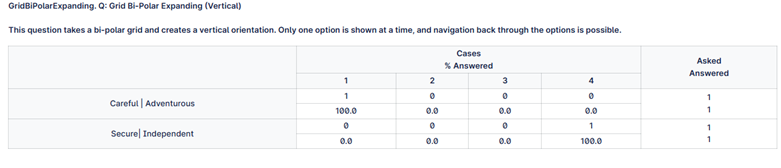
Example:
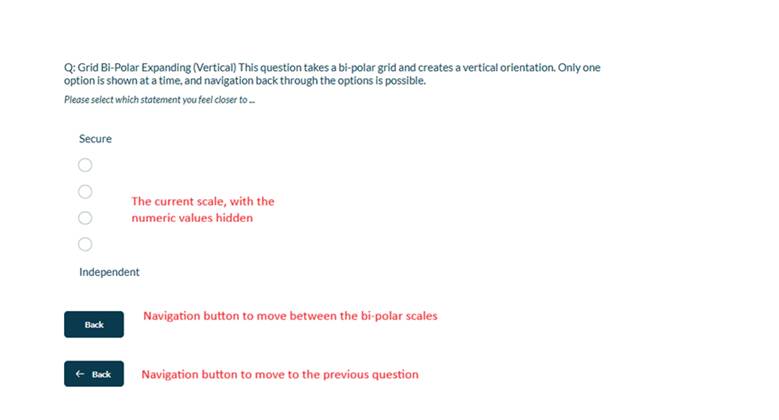
Setup:
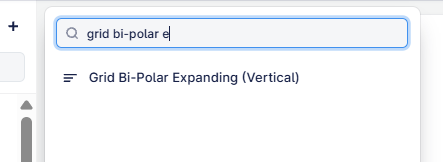
The Grid Bi-Polar Expanding (Vertical) can be added as below:
Here is an example of how to set up the question.
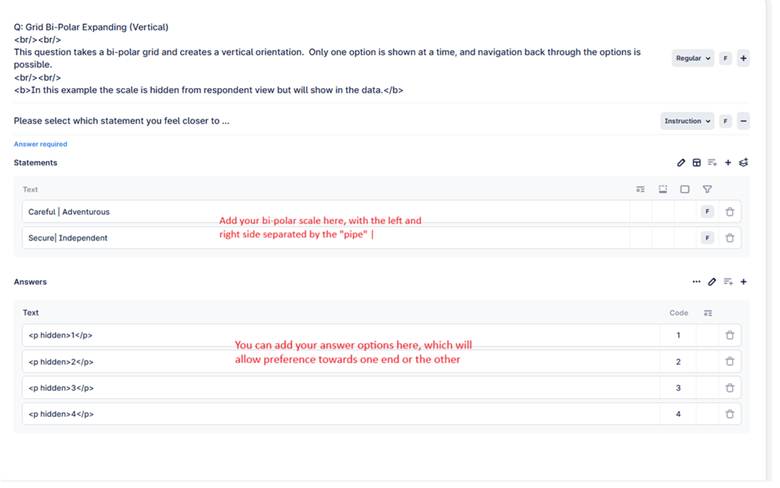
Note the scale options can either be shown or hidden to the respondent. If you would prefer to show a scale of 1-2-3-4, or perhaps 1-2-2-1 you can enter these directly and they will appear on the question.
If you would rather present an empty scale, you can add them like this, where the “hidden” will hide the text, but it will show up in your data. You will need to ensure you have the correct “rich text” settings to be able to see the html.
<p hidden>1</p>
Visualisations:
There are no visulaisation settings for this question, the view is a standard grid, and all the splitting of the grid is handled automatically.