Using Walr’s “No Code” solution, our highly customisable custom questions allow you to modify them without needing to understand any coding or programming. Everything is presented through options in our “Visualisation”, allowing you to adjust the question to get exactly the format you need.
What is it?
Custom Question module for open-end text questions that monitors typing behaviour: it detects paste events, measures active typing time vs interruptions, counts words/characters, computes a words-per-minute score, and writes those metrics into the hidden/text fields on the page.
When to use it?
Use when you want to flag likely pasted or non-organic answers, measure respondent effort (time/interruptions/typing speed) for long open-end tasks (essay / feedback).
Can I test it?
Survey link: https://survey.walr.com/pXAMk7?qq=15
Note that you will see additional rows in the debug mode, these are shown for testing only, and would be hidden when the survey is live.
Data
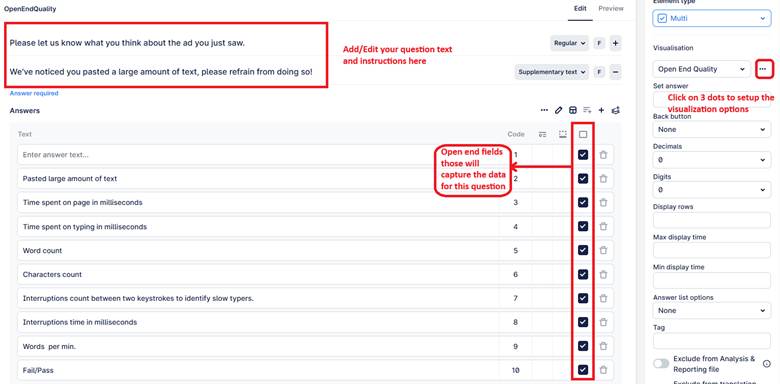
This question uses a multi open-end structure. The first input field is visible to respondents and captures their response, while the remaining fields are hidden and automatically populated with quality and behavior metrics.
In our Analysis & Reporting tool you can view it in the data view.

Example:
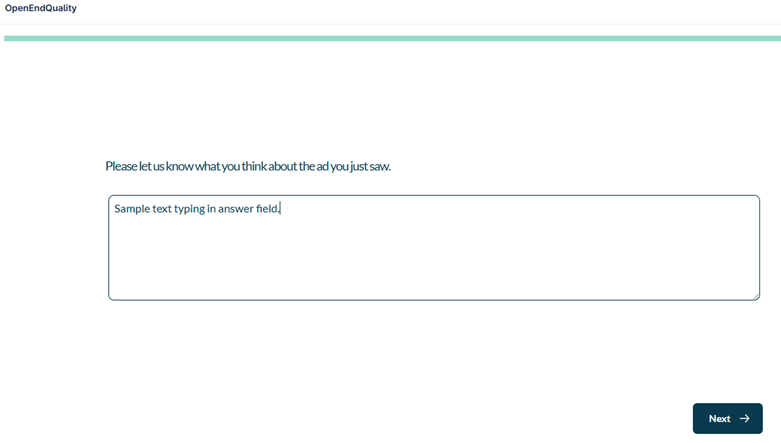
Setup:
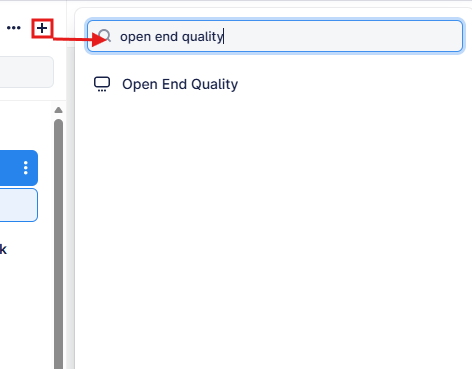
The Open End Quality can be found in the “Add New Element” section as shown.
Here is an example of how to set up the question. The additional fields will be prepopulated.
Note this works best on a question where you are capturing responses in a single open end box. There is no termination on this question unless you decide to add it yourself. Instead this can be used as a measure of data quality on post completion checks and any flagged respondents can be manually disqualified.
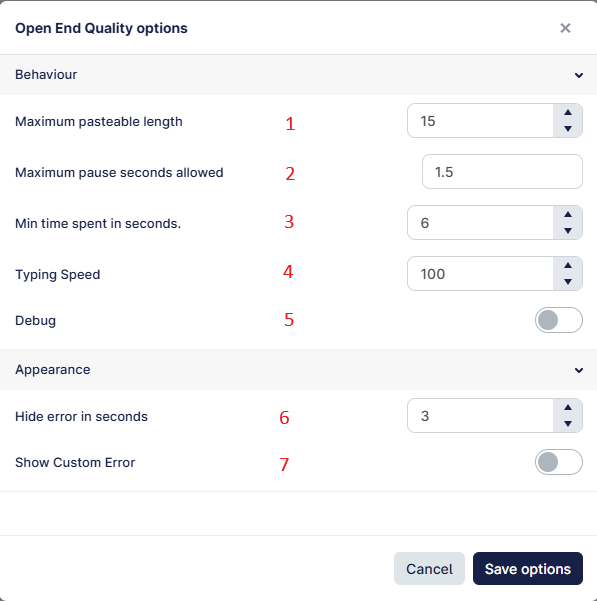
- Defines the maximum number of acceptable characters that can be pasted into the answer field – anything under this limit will not be flagged; any longer pastes will be flagged.
- Sets the maximum allowed pause (in seconds) between two keystrokes; longer pauses are treated as interruptions and flagged.
- Specifies the minimum time (in seconds) a respondent must spend on the page; faster submissions will be flagged.
- Defines the maximum allowed typing speed (words per minute); exceeding this speed will be flagged.
- When enabled, displays all hidden tracking fields in real time for debugging purposes. This should be disabled when the survey is published to live.
- Specifies how long (in seconds) the error message remains visible after a long paste is detected, if #7 below is enabled.
- When enabled, displays a custom error message (from Supplementary text) on long paste detection.