Using Walr’s “No Code” solution, our highly customisable custom questions allow you to modify them without needing to understand any coding or programming. Everything is presented through options in our “Visualisation”, allowing you to adjust the question to get exactly the format you need.
What is it?
The Date Picker is a custom question that allows respondents to enter or select a date in a clear and controlled format.
- It can be used for a single date selection, such as date of birth, visit date, purchase date, appointment date, or any other question where a valid date needs to be captured.
- It can also support a date range, where respondents provide both a “From” and “To” date
- It improves the respondent experience by offering a guided input, optional calendar selection, clear formatting, and validation to prevent unusable date responses.
When to use it?
Use the Date Picker when you need respondents to provide a date in a consistent format.
For example:
- Date of birth
- Date of purchase
- Date of visit
- Start and end date of an activity
- Travel dates
- Membership or usage period
This is especially useful when free text date entry may cause inconsistent answers, incorrect formats, or invalid dates.
What languages are supported?
All Survey Builder languages.
The visible text, placeholders, validation messages, and labels can be adjusted through the question setup.
Can I test it?
Survey link: https://survey.walr.com/pXAMk7?qq=19
Data
The data for this question will be a standard open type data variable, and the response will be shown as entered by respondent.

In our Analysis & Reporting tool you can view the date as raw data.
Example:
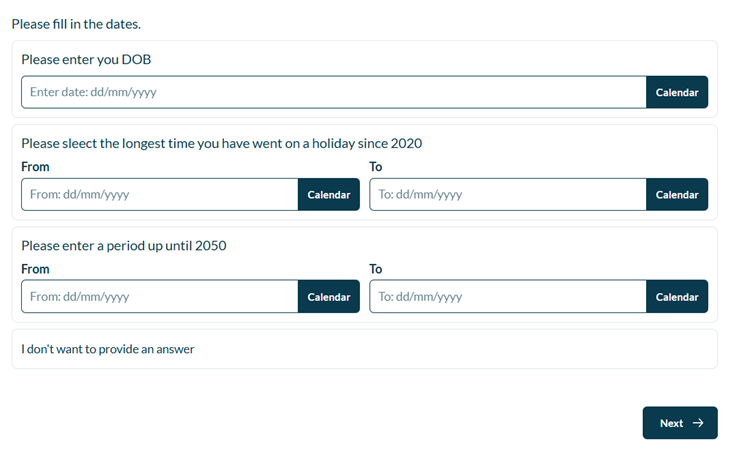
Setup:
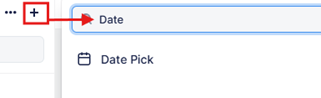
The Date pick can be found in the “Add New Element” section as shown.
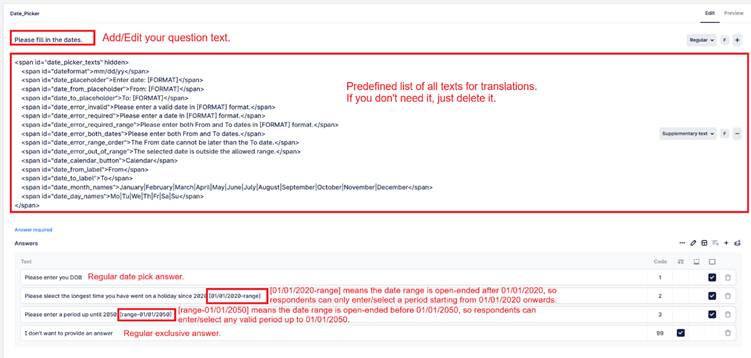
Here is an example of how to set up the question.