Using Walr’s “No Code” solution, our highly customisable custom questions allow you to modify them without needing to understand any coding or programming. Everything is presented through options in our “Visualisation”, allowing you to adjust the question to get exactly the format you need.
What is it?
DMA (Designated Market Area) It is a lookup tool that reads a tab-separated reference file (ZIP → attributes) and, when a respondent types a ZIP into the first answer row, performs an exact-match lookup and auto-fills the remaining answer rows (state / DMA / city-size, etc.)
Note that you will need your own lookup file in a specific format (see further below).
When to use it?
Use this tool whenever you need to auto-populate survey answer fields from a ZIP-based reference table based on zip code.
Can I test it?
Survey link: https://survey.walr.com/pXAMk7?qq=17
What languages are supported?
All Survey Builder languages.
Data
The underlying question type for this question is an open text. In our Analysis & Reporting tool you can view it in the data view.

Setup:
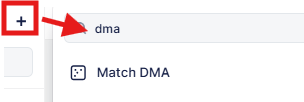
The Match DMA can be found in the “Add New Element” section as shown.
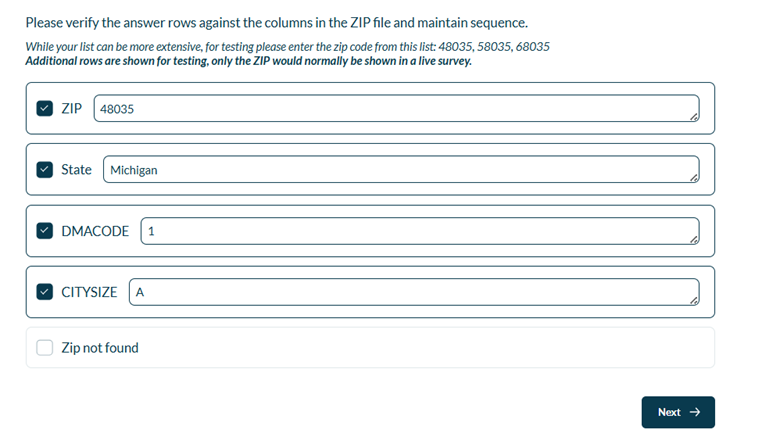
Example:
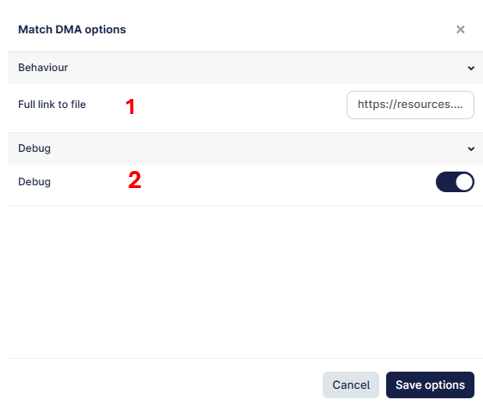
Insert the URl for the file, this can be an external file or hosted on the Walr File Library.
Note that the file needs to be in a specific format and include 4 columns, even if you are not using the rest of the rows in the question.
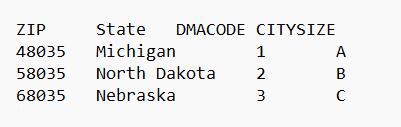
You can change the names of the columns and insert any values you want, as long as the format is “tab delimited text file”. The file format below will verify the zip code exists and post the values 1 in the remaining text boxes.
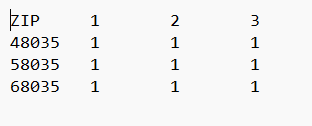
If you wanted to flag anyone that did not have a valid zip code, you can use the answer “zip not found” to either route them out of the survey or to a specific question.
Debug will show all the rows so you can see the data being populated.
This should be turned off when your survey is live.