
Survey Builder allows the randomisation of questions or the answers within a question.
Within a section you can randomise the order that questions are seen.
For example, if you wanted to show Q1,Q2,Q3 in an alternating fashion or if Q1-Q3 was shown as one block and then Q4-Q6 as another, alternating the order between respondents.
Answers can also be randomised in a similar fashion, with blocks of answers kept together or fixed in place.
Note that sections cannot be randomised.
In addition to the randomisation below, you can "synchronize" the rotation across multiple questions so that the list remains in the same randomised order throughout.
e.g. if the order of answers is A,C,D,B, then this order will be retained wherever the matching list and synchronisation value is used.
When to use each type of rotation?
[note that you can use upper- or lower-case letters e.g. N or n, R or r, S or s, A or a]
The main purpose of rotation is to eliminate respondent bias. There is a theory/a lot of evidence that says that most people will pick the first few choices in a survey. If that is always the same order for a question, then response bias may be introduced iin the final data and produce inaccurate results.
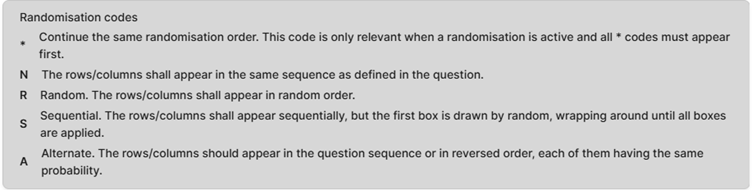
*Continue the same rotation order. This code is only relevant when a rotation is active and all asterisk-marked codes must appear first. This is used in multi rotation, so that rotation sequences can be continued.
N The rows shall appear in the same sequence as defined in the question. This means that the rows will not rotate when you enter “N". This is useful to either lock specific rows into place such as “other”, “none of the above”, etc that we don’t want to be part of the rotation.
R Random. The rows shall appear in random order. This is the most common form of rotation. It will ensure that all of the answer choices with the “R" next to them are displayed in a random order to each respondent. Note that you only need to add "R" to the beginning of the randomisation, not for every answer code.
S Sequential. The rows shall appear sequentially, but the first box is drawn by random, wrapping around until all boxes are applied. This type of rotation is more commonly used with blocks of questions than it is with answer choice lists. Survey Builder will pick the first response at random for a respondent, and then keep the other codes in order. For example, if it picks “3” at random, it will then show the codes in order of 3, 1, 2, 4, 5, etc until the end of the list.
A Alternate. The rows should appear in the question sequence or in reversed order, each of them having the same probability. This will alternate at random with respondents seeing either the codes in order forwards or backwards i.e. 1, 2, 3, 4, 5 or 5, 4, 3, 2, 1. This might be used for brand lists (for example) where you want to introduce some rotation, but you largely want to keep the answers in alphabetical or reverse alphabetical order to make it easier for the respondent to find the brand(s) they want to select.